AI Agents and Human Control
Week 2 · Technical Foundations 1
2026-09-21
Language models
What a transformer does, and how it became a chatbot that reasons
What is a transformer?
A next-token predictor.
Today’s LLMs only have decoders. Every transformer in this class is a decoder-only transformer.
Text goes in as tokens. A stack of identical blocks reads them. The top of the stack outputs a probability for every possible next token.
Autoregressive decoding
The model does not output a sentence. It outputs one distribution over the next token.
Something outside the stack has to pick a token from that distribution, append it to the input, and run the stack again.
That loop is decoding.
Decoding, one token at a time
Each pass reads everything so far and produces one distribution.
One token is chosen and appended. The whole sequence goes back in.
Repeat.
The model itself decides when to stop, by emitting an end-of-sequence token.
What does attention do?
Every block has one attention layer. There are N of them.
We go into the first one. Its input is just the token embeddings, which makes it the easiest to explain.
Attention: a new token looks back at everything before it
Linear projections: \(Q = XW_Q,\; K = XW_K,\; V = XW_V\)
Causal self-attention: \(A = \mathrm{softmax}\!\left(\dfrac{QK^\top + M}{\sqrt{d_k}}\right),\; O = AV\)
The new token becomes a query \(q_t\).
Every token so far has a key. The query is compared against all of them.
Softmax turns the scores into weights that sum to 1.
The output is a weighted mix of the values. Not a lookup, a blend.
Context length is input plus output
Attention compares the new token against every token so far. As the sequence grows, that comparison grows with it.
“Context length” counts everything in the sequence: the prompt and the tokens the model has generated.
Why is context length limited at all?
KV cache
Keys and values for earlier tokens do not change when a new token arrives. So they are computed once and kept.
Each new token only computes its own key and value, and reads the cached rest.
The cache is a prefix. Change anything early in the sequence and everything after it is recomputed.
So: do not change your system prompt between calls.
Chatbot era: instruction following
Base model, GPT-3
Prompt: Explain the moon landing to a 6 year old in a few sentences.
Completion: Explain the theory of gravity to a 6 year old. Explain the theory of relativity to a 6 year old in a few sentences. Explain the big bang theory to a 6 year old. Explain evolution to a 6 year old.
After instruction tuning, InstructGPT
Prompt: Explain the moon landing to a 6 year old in a few sentences.
Completion: People went to the moon, and they took pictures of what they saw, and sent them back to the earth so we could all see them.
A next-token predictor continues the text. A chatbot answers it.
Example from OpenAI, “Aligning language models to follow instructions”, January 2022.
Step 1: supervised fine-tuning gets the format right
Method. People write the answer they would want for a sampled prompt. The model is fine-tuned to reproduce those prompt and answer pairs with ordinary next-token training.
Purpose. Teach the shape of a conversation: a prompt is followed by an answer, not by more prompts.
Limit. The model imitates the demonstrations. It has no signal about which of two plausible answers is better.
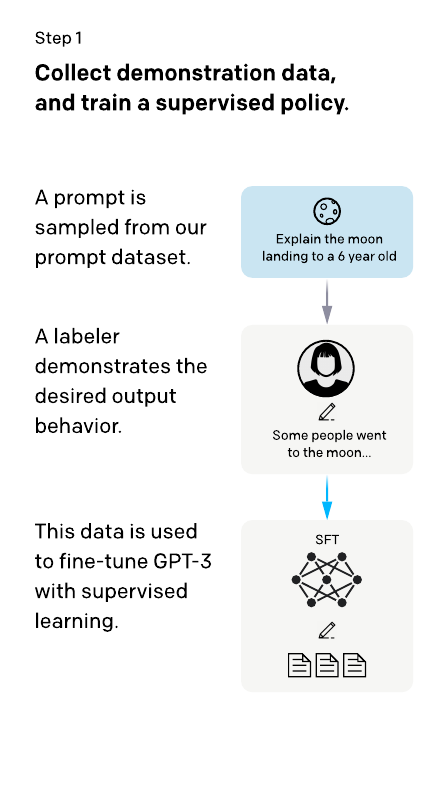
Step 1 of the InstructGPT recipe.
Ouyang et al., “Training language models to follow instructions with human feedback”, 2022, figure 2, step 1.
Step 2: RLHF aligns with human preference
Method. For one prompt, sample several answers. A person ranks them. A reward model is trained to predict that preference from pairs of answers. The chatbot is then trained by reinforcement learning to score highly under the reward model.
Purpose. Move from “an acceptable answer” to “the answer people prefer”: helpful, honest, harmless, in the trainers’ judgement.
What changed. The training signal is a comparison between two responses, not a target text.
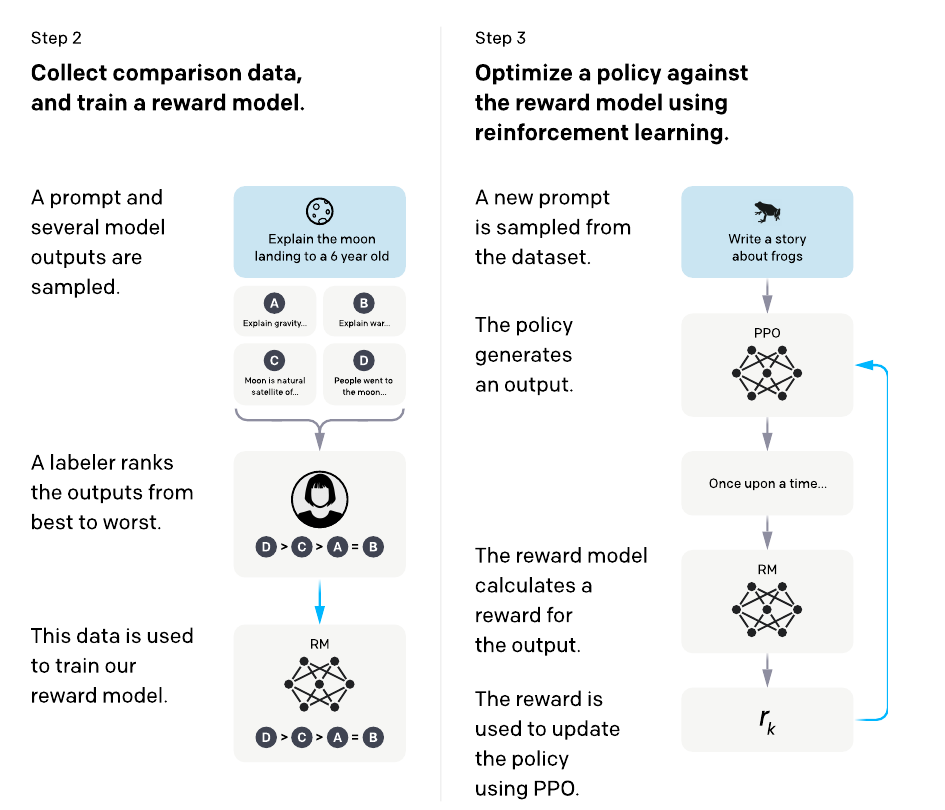
Steps 2 and 3 of the same recipe.
Ouyang et al., 2022, figure 2, steps 2 and 3.
Why reasoning?
AI should be able to learn from just a few examples, like what humans usually do.
Denny Zhou, “LLM Reasoning”, lecture in the Berkeley LLM Agents course, 2024
Key idea: derive the final answer through intermediate steps
Four ways this has been done, in order.
Training with intermediate steps
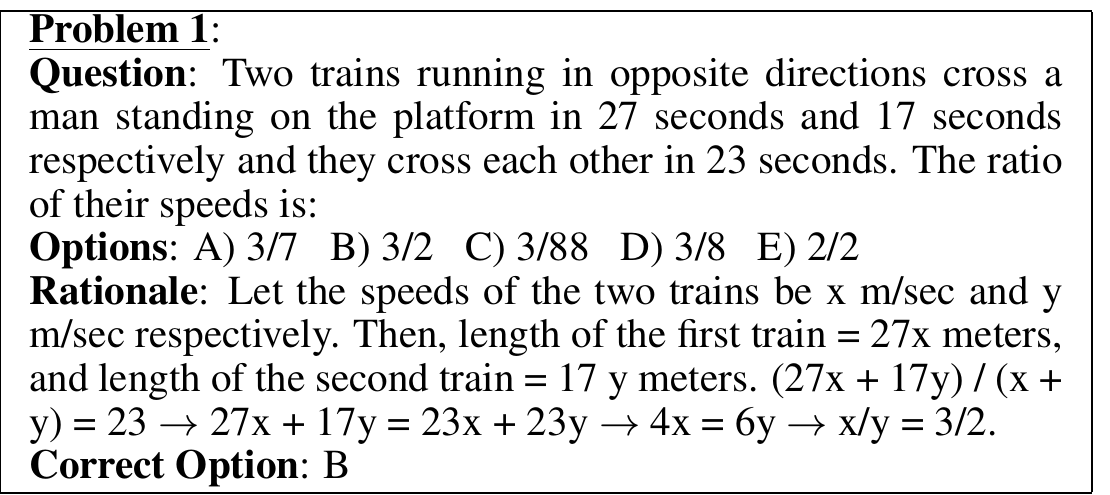
Train on rationales, not just answers.
Ling et al., “Program Induction by Rationale Generation: Learning to Solve and Explain Algebraic Word Problems”, ACL 2017, figure 1, problem 1.
Prompting with intermediate steps
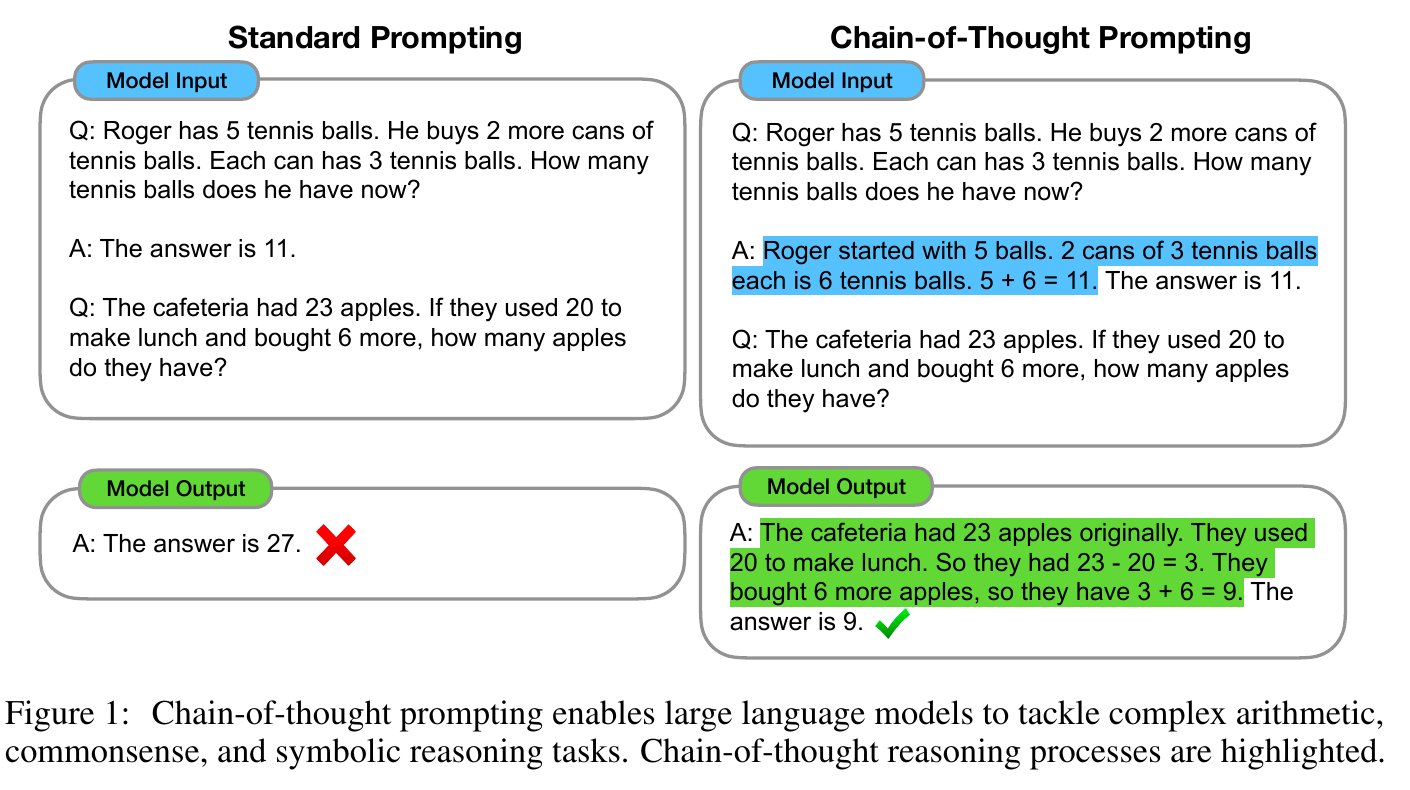
Put a worked example in the prompt and the model produces its own steps.
Wei et al., “Chain-of-Thought Prompting Elicits Reasoning in Large Language Models”, NeurIPS 2022, figure 1.
Reasoning without seeing examples
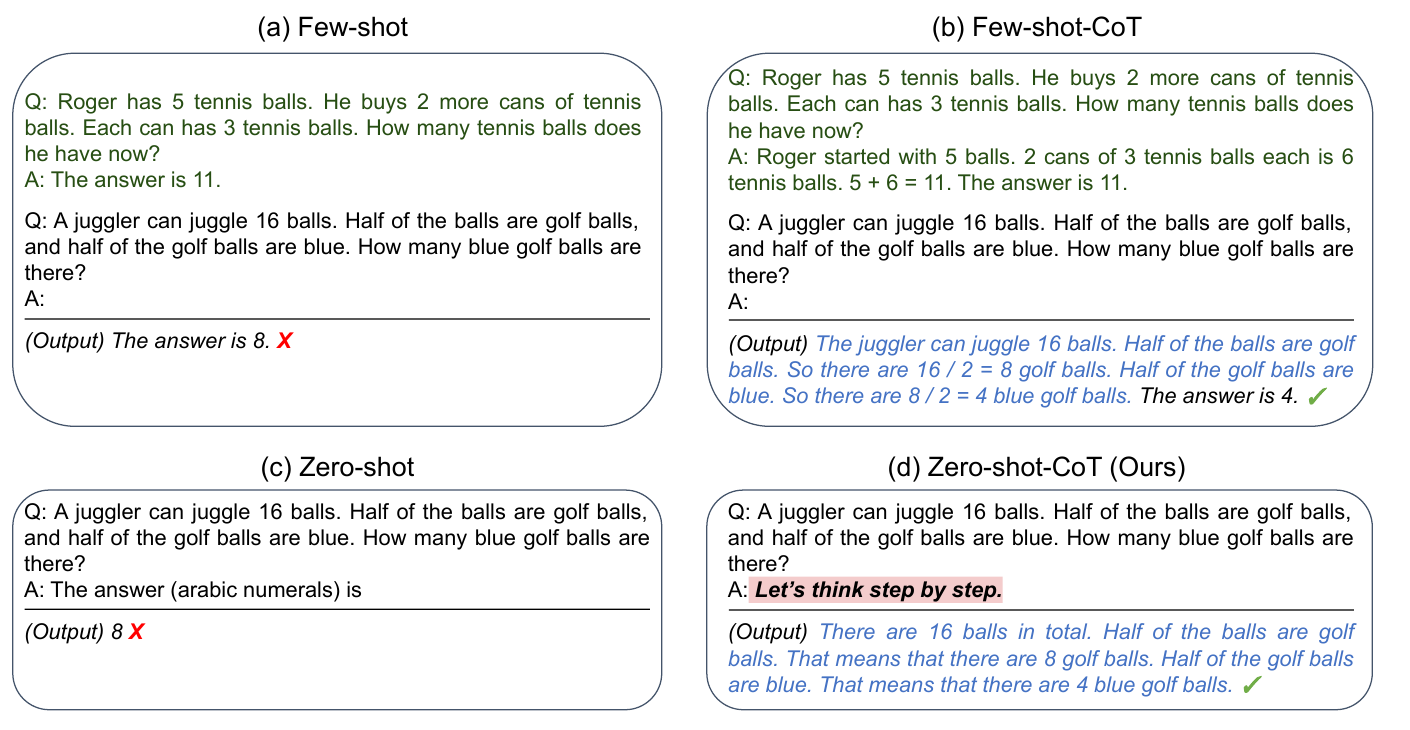
“Let’s think step by step.”
Kojima et al., “Large Language Models are Zero-Shot Reasoners”, NeurIPS 2022, figure 1.
Reasoning becomes a trained inference-time behaviour
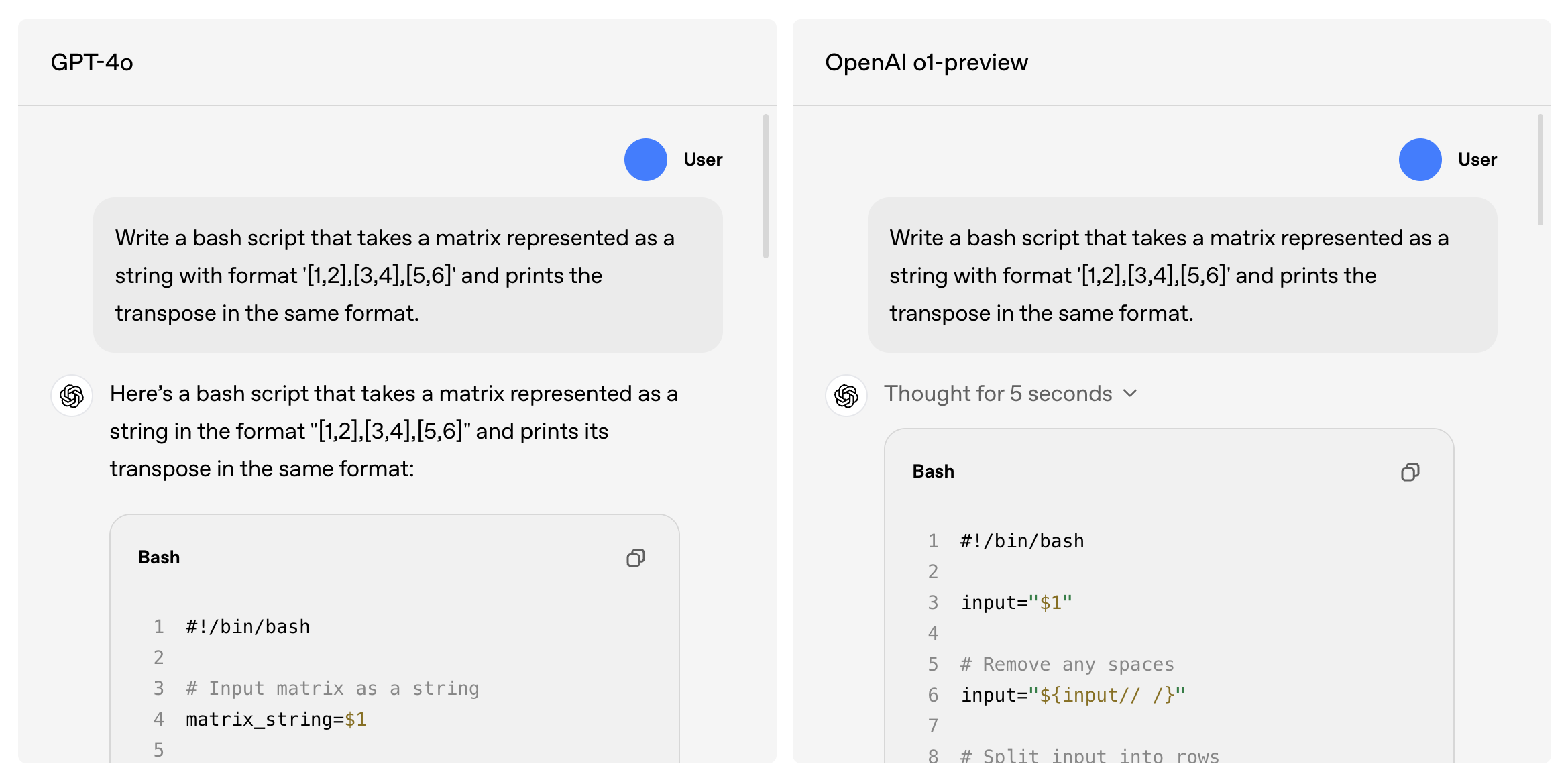
The model is trained to think before it answers, and “Thought for 5 seconds” becomes part of the product.
Source: openai.com/index/learning-to-reason-with-llms
Hiding the chain of thought is common practice
We believe that a hidden chain of thought presents a unique opportunity for monitoring models. Assuming it is faithful and legible, the hidden chain of thought allows us to "read the mind" of the model and understand its thought process. For example, in the future we may wish to monitor the chain of thought for signs of manipulating the user. However, for this to work the model must have freedom to express its thoughts in unaltered form, so we cannot train any policy compliance or user preferences onto the chain of thought. We also do not want to make an unaligned chain of thought directly visible to users. Therefore, […] we have decided not to show the raw chains of thought to users.
OpenAI, "Learning to Reason with LLMs", September 2024
Open-weight models have to show their reasoning
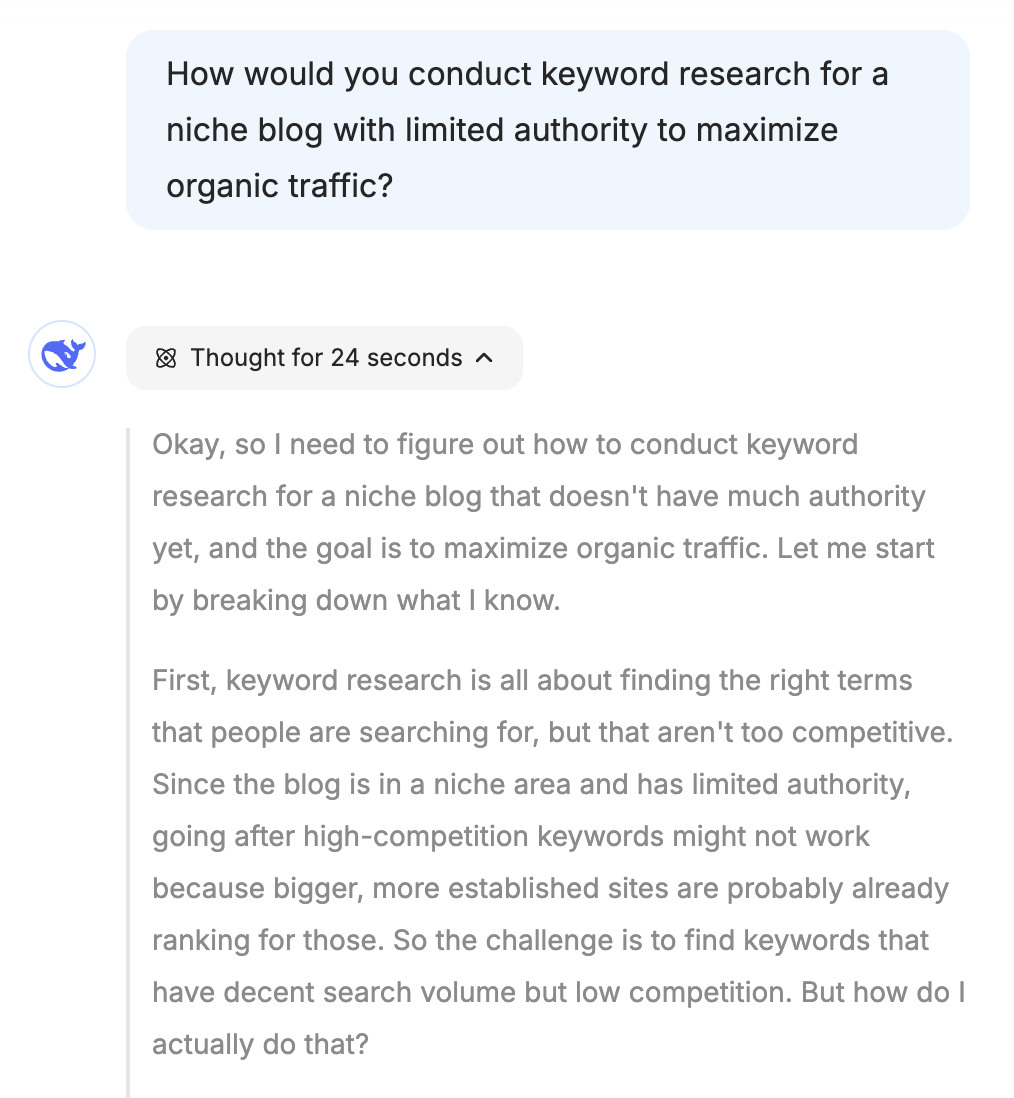
DeepSeek-R1’s thinking is shown in full in the chat interface.
Screenshot from chat.deepseek.com, January 2025, via Search Engine Journal.
LM → Agent
From a model that answers to a model that acts
What does ReAct stand for?
Reasoning + Acting.
ReAct
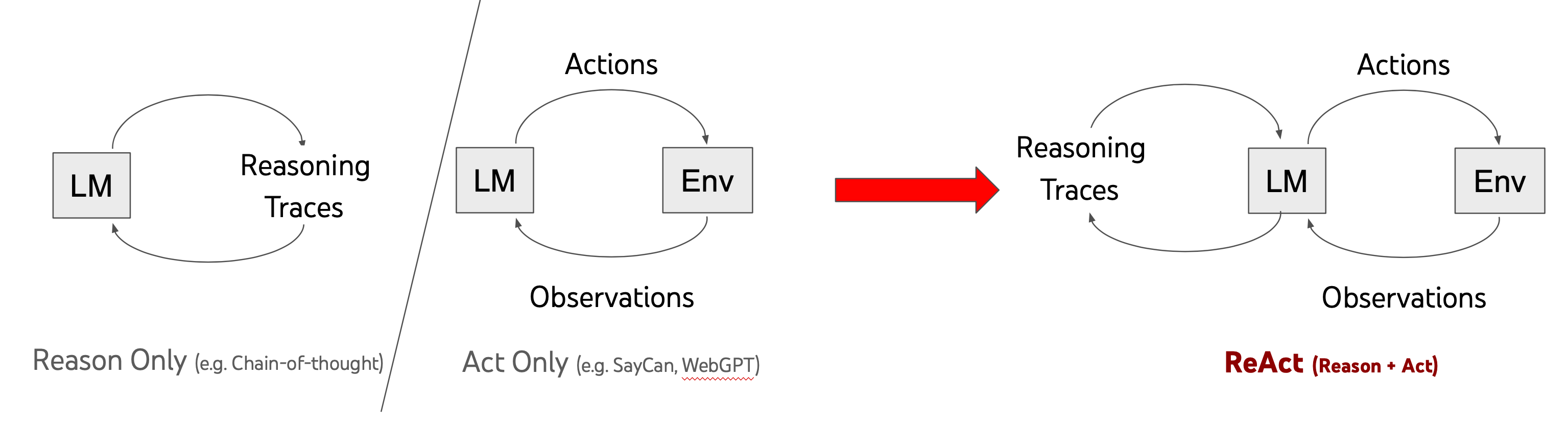
Reasoning traces and actions interleave in one loop with the environment.
Yao et al., “ReAct: Synergizing Reasoning and Acting in Language Models”, ICLR 2023. Figure from react-lm.github.io.
The agent loop
The context starts with a system prompt, tool definitions, and the task.
Each turn the model reads the whole context and emits either an action or a final answer.
An action is executed by the harness against the environment. The observation is appended to the context.
The loop ends when the model stops calling tools, or when the harness hits a limit.
A minimal implementation
def run(self, task):
    self.messages = [system_message(), task_message(task)]
    while True:
        self.step()
        if self.messages[-1].get("role") == "exit":
            break
    return self.messages[-1].get("extra", {})
def step(self):
    return self.execute_actions(self.query())
def query(self):
    message = self.model.query(self.messages)
    self.add_messages(message)
    return message
def execute_actions(self, message):
    actions = message.get("extra", {}).get("actions", [])
    outputs = [self.env.execute(action) for action in actions]
    observations = self.model.format_observation_messages(message, outputs, self.get_template_vars())
    return self.add_messages(*observations)
Lightly edited to fit: docstrings, type hints, error handling, cost and step limits, and saving are removed, and building the first two messages is folded into one line.
mini-swe-agent, src/minisweagent/agents/default.py, github.com/SWE-agent/mini-swe-agent, fetched 20 September 2026.
Still the backbone of today’s agents
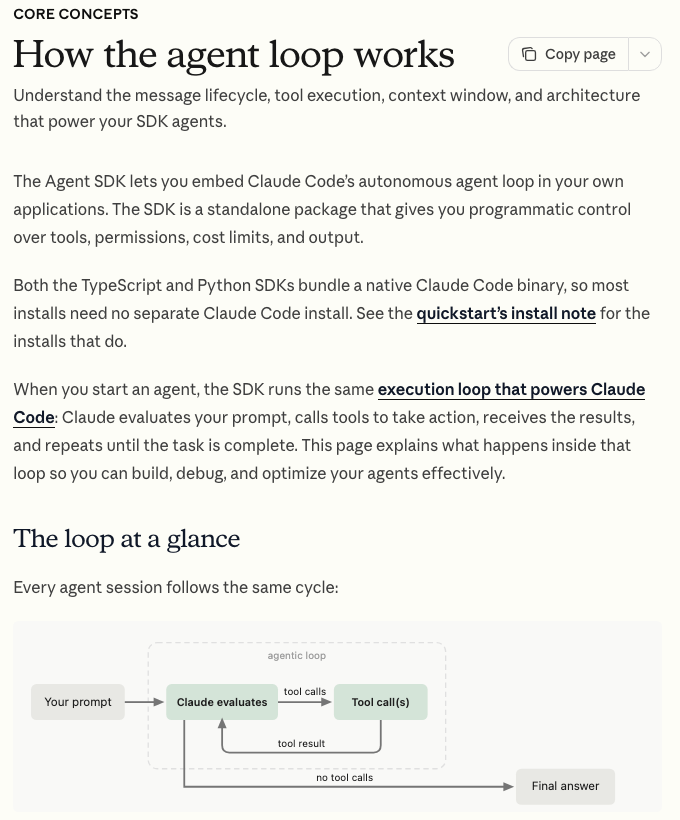
“Claude evaluates your prompt, calls tools to take action, receives the results, and repeats until the task is complete.”
Claude Agent SDK docs, How the agent loop works, 2026.
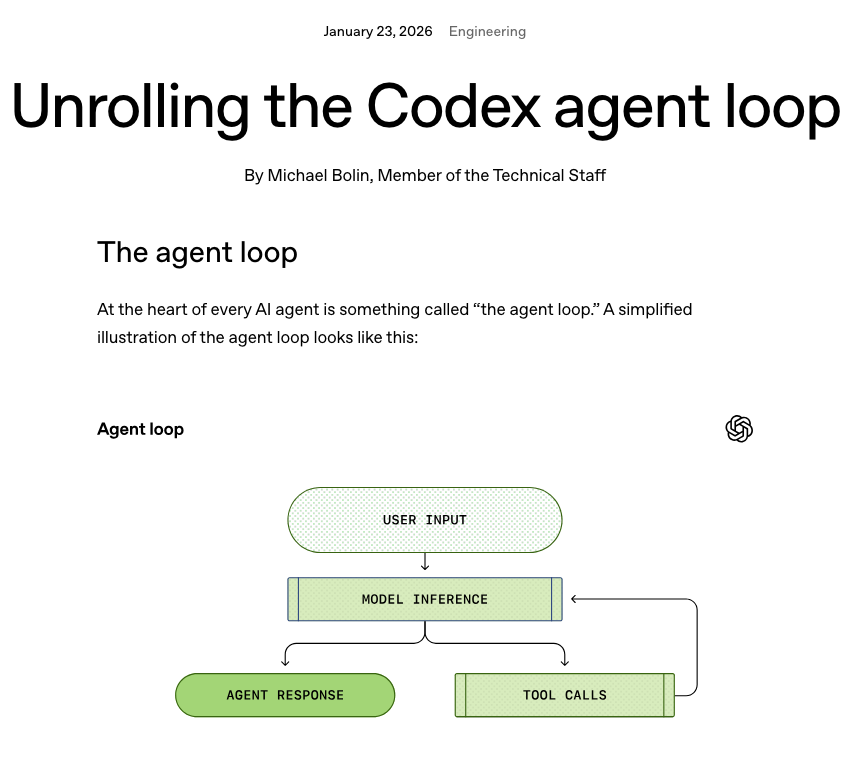
“This process repeats until the model stops emitting tool calls and instead produces a message for the user.”
OpenAI, Unrolling the Codex agent loop, January 2026.
Building blocks of a modern agent
What sits around the model
Building blocks
LM
The model. It reads the context and writes the next message.
Harness
Everything around the model.
- Tool calling
- Context management
- Memory / skills
- …
Agent capabilities
Mostly built at the model and harness level
- Accurate tool calling: right tool, right format, right parameters
- Coherent over long context
- Efficiency: time and cost
- Environment understanding
- Complex task management
- Safety
- Customizability
What can be solved by harness and model?
Most of them.
Do you fix a problem at the harness or the model level?
First the harness. Then it gets trained into the model.
Legacy. Patterns in the harness are trained into the model, so the model then supports those patterns better than others. Compatibility is forced.
What needs interface and governance as well?
Anything that must be customised to a really complex human specification.
More human-centred metrics. Trust. Undesired surprise.
Tool calling
How a model touches the world
What is a tool?
An LM-used tool is a function interface to a computer program that runs externally to the LM, where the LM generates the function calls and input arguments in order to use the tool.
Wang et al., “What Are Tools Anyway? A Survey from the Language Model Perspective”, 2024, Definition 1
Why tools?
Can anyone think of an example?
Extend
Things the model cannot do at all.
The model cannot get the current time without a tool.
Facilitate
Things the model can do, but does better with a tool.
The model can do arithmetic, but it is slower and less accurate than a calculator.
Four tool calls
Web search
web_search(query="2026 Boston Marathon winner")Execute code
run_python(code="a,b=0,1\nfor _ in range(40): a,b=b,a+b\nprint(a)")102334155Image generation
generate_image(prompt="minimal poster, reading group, ...", size="1024x1536")Custom function
book_room(date="2026-09-22", start="15:00", people=4){"room": "230B", "confirmed": true}Code as tool
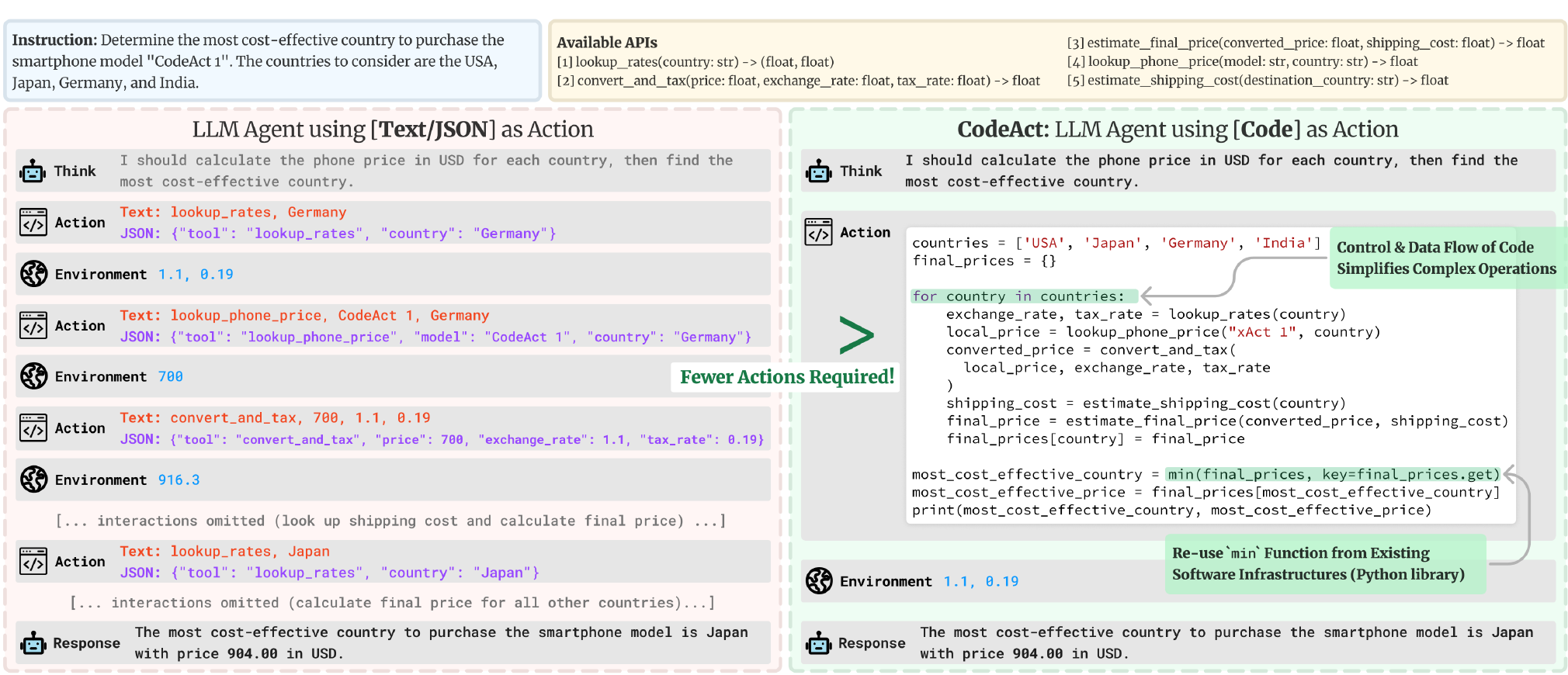
One code action replaces a sequence of JSON tool calls and can loop, branch, and reuse libraries.
Wang et al., “Executable Code Actions Elicit Better LLM Agents”, ICML 2024, figure 1 (top).
Code is a high-power tool
Expressive. Hard to constrain. Higher impact. Sandboxing is a later lecture.
One at a time, or several at once
A model can emit one tool call per turn, or several in parallel. More on that at the end of this section.
Mechanics: the model asks, the harness acts
The model requests an action, as tokens. The harness executes it.
The harness sends the model tool schemas
"tools": [
  {
    "name": "get_weather",
    "description": "Current weather for a city.",
    "input_schema": {
      "type": "object",
      "properties": {
        "city":  {"type": "string"},
        "units": {"type": "string", "enum": ["C", "F"]}
      },
      "required": ["city"]
    }
  },
  {
    "name": "book_room",
    "description": "Reserve a meeting room.",
    "input_schema": { "..." : "..." }
  }
]
A list of tool definitions: name, description, and the shape of the arguments.
The format follows the model’s own protocol. It was fixed during training.
Traditionally the list goes into the system prompt, at the beginning.
What is the caveat? Think about the KV cache.
Newer methods load tool definitions on demand, when the model asks for them.
The model emits a tool call
Definition, sent by the harness
Results return by call ID
Tool call
Constrained decoding
A malformed tool call
Three faults: Boston is not quoted, "Celsius" is not one of C or F, and the trailing comma is not valid JSON.
At decoding time, tokens that would make the call invalid are masked out. The model can only emit a well-formed call.
What the constraints check:
- Syntax: valid JSON
- Shape: the expected fields
- Types:
cityis a string - Values:
unitsis C or F
REST APIs expose functions over HTTP
from fastapi import FastAPI, Header, HTTPException
from weatherlib import current_weather   # the library function

app = FastAPI()

@app.get("/weather")
def weather(city: str, units: str = "C",
            x_api_key: str = Header(...)):
    if x_api_key != API_KEY:
        raise HTTPException(401)
    return current_weather(city, units)
A REST API makes a function remotely callable.
FastAPI binds the library function to an endpoint and requires an API key in a header.
Now any program on the network can call it, including an agent.
REST API servers publish OpenAPI descriptions
paths:
  /weather:
    get:
      summary: Current weather for a city.
      parameters:
        - {name: city,  in: query, required: true,
           schema: {type: string}}
        - {name: units, in: query,
           schema: {type: string, enum: [C, F]}}
      security: [{ApiKeyAuth: []}]
components:
  securitySchemes:
    ApiKeyAuth: {type: apiKey, in: header,
                 name: X-API-Key}
OpenAPI describes the HTTP operation: path, method, parameters, and how to authenticate.
It is the same information as a tool definition. Many harnesses turn an OpenAPI file into tool schemas directly.
Agents often call REST APIs with curl
Tool call emitted by the model
MCP is an alternative agent-facing interface
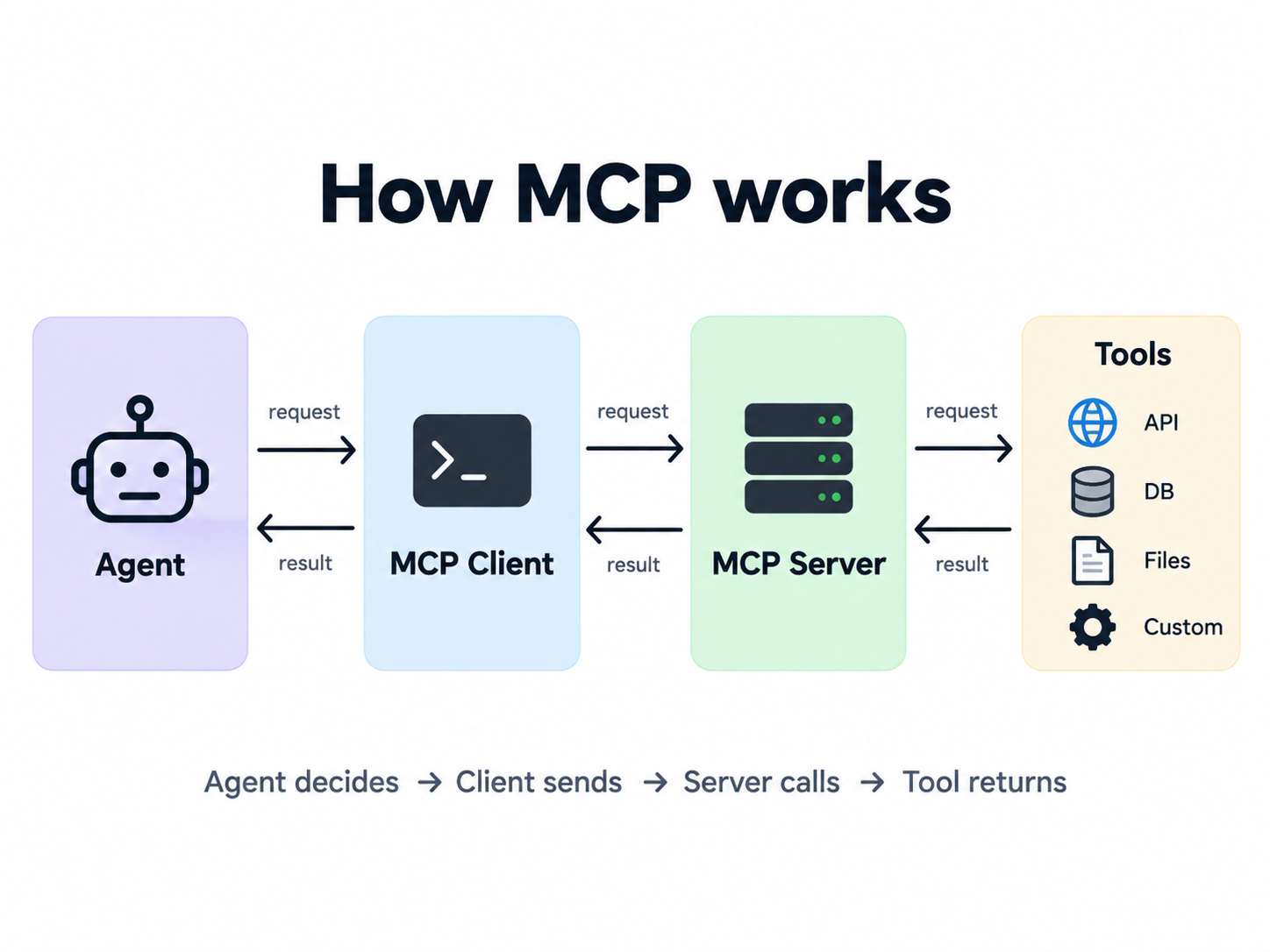
The agent talks to an MCP client. The MCP server holds the connection to the actual tool.
MCP keeps credentials out of the model’s context
import os, httpx
from mcp.server.fastmcp import FastMCP

mcp = FastMCP("weather")
API_KEY = os.environ["WEATHER_API_KEY"]   # lives on the server

@mcp.tool()
def get_weather(city: str, units: str = "C") -> str:
    """Current weather for a city."""
    r = httpx.get("https://api.example.com/weather",
                  params={"city": city, "units": units},
                  headers={"X-API-Key": API_KEY})
    return r.text
The model sees a tool called get_weather with two arguments.
The server adds the API key when it calls the upstream API. The key never appears in a tool definition, a tool call, or a tool result.
Sequential tool calls waste time
The user asked for the weather, the news, and their calendar for tomorrow.
None of the three calls depends on another. Issuing them one per turn adds up the waits and adds a model turn between each.
Parallel tool calls
The model emits three tool calls in one message. The harness runs them concurrently and returns all three results together.
Concurrent execution in the harness
import asyncio

async def execute(call):
    fn = TOOLS[call["name"]]
    result = await fn(**call["input"])
    return {"type": "tool_result",
            "tool_use_id": call["id"],
            "content": result}

async def run_tool_calls(function_calls):
    results = await asyncio.gather(
        *(execute(call) for call in function_calls),
        return_exceptions=True,
    )
    return list(results)
All calls start at once. The harness waits for the slowest one.
- Each result carries the
tool_use_idfrom the slide on call IDs. That is how the model matches results back to calls when they come back in any order. return_exceptions=Truekeeps one failed call from cancelling the others; the error becomes that call’s result.
Long context management
Why the context grows and what it is made of
Quadratic input from linear history growth
\(\mathrm{input}_t = \text{fixed prefix} + \text{history before call } t\)
The history grows by one action and one observation per turn. Every turn re-reads all of it. Total input over a task grows with the square of the number of turns.
What is in an agent’s context?
Mean of 77,922 tokens per session across 1,500 OpenHands sessions.
Source: CMU 11-768, AI Agents.
Two challenges: capacity and efficiency
We continue on this next week.
Course logistics: recap and changes
What changed since last Monday
Registration, teams, presentations
Registration is not finalised yet.
Teams will be set up after that. Submit your team constraints through the Google Form by Friday, September 25, midnight.
Research spotlight assignments will be announced on Wednesday, after the course drop period.
The project timeline has been pushed back
| Checkpoint | Was | Now |
|---|---|---|
| Team constraints | Sep 25 | |
| Early scope check-in | week of Sep 28 | week of Oct 26 |
| Project pitch, in class | Oct 19 | Nov 2 |
| Test case check meeting | week of Nov 9 | |
| Curated test cases | Nov 9 | Nov 16 |
| Final presentation | Dec 14 | |
| Report and website | TBD |
The website calendar has the current dates. Project deliverables go through Teams.
Two sources of information
Schedule, readings, spotlight themes, policies, resources.
Announcements and all assignments.
This is a change. Everything that was on HotCRP or Teams moves to Canvas, so there is one place to manage for everyone.
Break
Back in 10 minutes.
Studio
Reading agent trajectories. 50 minutes, in pairs.
The studio page
peach-research-lab.github.io/agent-human-control/studio/w2
Real runs of an open source agent on a small local model. What you see is exactly what the model received and produced.
Three views. Annotated is for reading. Model input is the one string the model actually read. Raw JSON is the file on disk.
Marking a message. Tag it “Issue here” and write in the note box. Notes save in your browser. Export gives you a Markdown file to paste into Teams.
Do this without an AI assistant. You can use one for the reflection later and compare.
Round 1: warm-up
10 minutes
Trajectory: fix a failing test. Seven calls, no errors. Four prompts on the page:
- Count and match the calls and results.
- List the steps, and the one that changed a file.
- Find the tool definitions and a tool result in the token string.
- Explain the cached tokens.
Round 2: find the problem
30 minutes
Five trajectories, tasks A to E. One planted problem each. Do as many as you can, in the order A, B, D, C, E.
Three prompts per task:
- How did the agent complete the task?
- What goes wrong?
- A hint question that leads to the problem.
Debrief: what went wrong?
For each task, A to E: what went wrong, and which message shows it first?
Studio reflection
Pick one round 2 trajectory.
Say what went wrong, which message shows it first, and where in the run a person could have stepped in and caught it.
Optional: run the same trajectory past an AI assistant and report what it caught and what it missed.
Export your notes from the studio page and paste them into your Teams submission. Due Friday, September 25, midnight.
Next class
Before next Monday
Before next Monday
Submit the studio reflection by this Friday, September 25, midnight.
Submit the reading response by next Monday, September 28, noon.
Packer et al., MemGPT: Towards LLMs as Operating Systems, 2023.
Both are submitted on Canvas.
Research spotlight begins October 5.
Next week: Technical Foundations 2
References
- Ling, W., Yogatama, D., Dyer, C., and Blunsom, P. Program Induction by Rationale Generation: Learning to Solve and Explain Algebraic Word Problems. ACL 2017. arXiv 1705.04146.
- Wei, J. et al. Chain-of-Thought Prompting Elicits Reasoning in Large Language Models. NeurIPS 2022. arXiv 2201.11903.
- Kojima, T. et al. Large Language Models are Zero-Shot Reasoners. NeurIPS 2022. arXiv 2205.11916.
- Ouyang, L. et al. Training language models to follow instructions with human feedback. NeurIPS 2022. arXiv 2203.02155. Before/after example from openai.com/blog/instruction-following, 27 January 2022.
- Zhou, D. LLM Reasoning. Lecture, Berkeley CS294/194-196 Large Language Model Agents, 2024. rdi.berkeley.edu/llm-agents/assets/llm-reasoning.pdf
- OpenAI. Learning to Reason with LLMs. 12 September 2024. openai.com/index/learning-to-reason-with-llms
- Southern, M. G. DeepSeek-R1: The Open-Source AI Challenging ChatGPT. Search Engine Journal, January 2025.
- Yao, S. et al. ReAct: Synergizing Reasoning and Acting in Language Models. ICLR 2023. arXiv 2210.03629. Figure from react-lm.github.io.
- SWE-agent. mini-swe-agent, src/minisweagent/agents/default.py. github.com/SWE-agent/mini-swe-agent, fetched 20 September 2026.
- Wang, Z., Cheng, Z., Zhu, H., Fried, D., and Neubig, G. What Are Tools Anyway? A Survey from the Language Model Perspective. COLM 2024. arXiv 2403.15452.
- Wang, X. et al. Executable Code Actions Elicit Better LLM Agents. ICML 2024. arXiv 2402.01030.
- CMU 11-768, AI Agents. Context composition statistics over 1,500 OpenHands sessions.
- Course website: calendar and Research spotlight pages; HotCRP at neu-agentcontrolfall26.hotcrp.com.